Salesforce audit: how to assess the quality of your org in 2026


What would an independent expert say about your Salesforce org if they reviewed it today?
Many companies cannot answer this with confidence. Salesforce may support daily work, but it is not always clear how much custom code is running behind the scenes, how many automations depend on one another, or how risky the next major change could be.
One of Salesforce’s biggest strengths is flexibility. It can support global enterprises, growing companies, and smaller businesses with specific processes. But that flexibility also means small decisions can accumulate over time: a field added for one team, a Flow changed for one exception, a report created for one manager, or an integration adjusted under deadline pressure.
Over the years, these choices can turn into Salesforce technical debt. Changes become slower, releases become riskier, and teams may struggle to use new Salesforce features with confidence.
That is why a Salesforce audit matters. It gives you an independent, structured view of how your org is built, where the risks are, and what should be improved before problems affect users, reporting, security, or delivery.
What is a Salesforce audit?
A Salesforce audit is an independent, in-depth review of your Salesforce org. It looks at how the platform is configured, how your code and automations are built, how integrations work, how data is managed, and whether the setup still supports the way your teams operate today.
It is useful to separate a Salesforce audit from lighter review activities, because these terms are often used interchangeably.
A Salesforce Health Check is usually a broader, high-level review of visible risks and improvement areas, such as security settings, data quality, automation, user adoption, and general platform health. If this is the type of review you need, start with our guide on the importance of a Salesforce Health Check.
A full Salesforce org audit goes deeper. It reviews the technical foundations of your Salesforce environment, including Apex code quality, Flow architecture, integration design, the security model, scalability, and Salesforce technical debt. It does not only show what may be wrong. It explains why the issue exists, how serious it is, and what impact it may have on future changes.
A good Salesforce audit should answer questions such as:
- Is our custom code safe, maintainable, and scalable?
- Are our Flows and automations easy to understand and change?
- Does our security model create risks we cannot easily see?
- Are our integrations reliable, documented, and owned by the right team?
- How much Salesforce technical debt are we carrying?
- Can this org support our next stage of growth?
In simple terms, a Health Check helps you understand where to look. A Salesforce audit helps you understand what is really there, how much risk it creates, and what should be done about it.
Why Salesforce technical debt grows so quietly
Salesforce technical debt rarely appears because of one big mistake. More often, it grows through many small decisions that made sense at the time but were never reviewed later.
A company starts with a clean setup. The team selects the appropriate licences, defines initial processes, and works with an internal team or partner on the Salesforce implementation. Go-live happens, the platform works, and users begin their daily work.
Then the business starts changing. Each change may be reasonable on its own. The problem starts when these changes are not documented, reviewed, or cleaned up over time.
After a year or two, the org may still work, but every new change takes longer than expected. Nobody is fully sure which automations depend on one another, which fields are still used, which integrations are business-critical, or which customisations can be safely removed.
This is how Salesforce technical debt becomes expensive. It slows delivery, increases risk, and makes releases harder to manage. It can also stop teams from using new Salesforce features because they are not sure how those changes will affect the existing setup.
A Salesforce audit helps make this hidden debt visible. It shows where the risks are, how serious they are, and what should be improved first.
Signs your org is overdue for a Salesforce audit
You do not always need to wait for a major failure before running a Salesforce audit. In many cases, the warning signs appear much earlier: slower changes, unclear ownership, unstable releases, or growing uncertainty about how the org really works.
Your organisation may be ready for a Salesforce org audit if several of these situations sound familiar:
- Every new change takes longer and costs more than it used to.
- Releases or deployments often create unexpected issues.
- Nobody can clearly explain how some automations, integrations, or custom code work.
- The org depends too heavily on a single developer, one vendor, or a multivendor Salesforce delivery setup with unclear ownership.
- Users report errors that are difficult to reproduce and even harder to fix.
- Salesforce release updates are postponed because the team is not sure what they might affect.
- Security risks are suspected, but no one has recently completed a proper Salesforce security audit.
- The business does not fully trust the information it receives about platform quality, risks, or delivery timelines.
- New leadership wants an independent view of the current Salesforce setup.
A Salesforce audit helps replace opinions with facts. It gives decision-makers an independent view of what is working, what creates risk, and where Salesforce technical debt is slowing the business down.
What should a Salesforce audit cover?
A strong Salesforce audit should review both the functional and technical sides of your org.
The right audit scope depends on your Salesforce environment, but the core areas usually include:
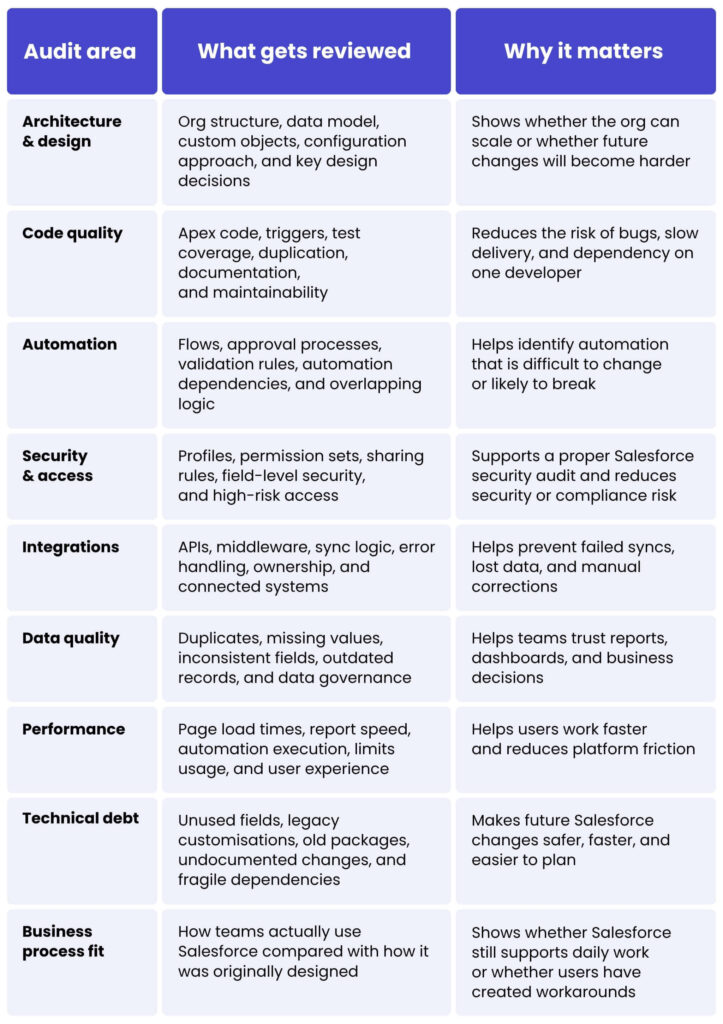
This last point is especially important when your organisation uses several products or different Salesforce cloud tools. A change in Sales Cloud can affect reporting. A Service Cloud process can depend on the same account data. A marketing integration can influence lead quality and campaign reporting. Salesforce should be reviewed as one connected platform, not as a set of separate technical items.
The goal is not to create a long list of every possible issue. The goal is to understand which parts of the org pose real risk, which findings affect the business most, and what should be improved first.
How the Spyrosoft CRM Audit Framework works
A good Salesforce audit needs a clear structure. Without it, the review can become too broad, too technical, or disconnected from the business questions that started the audit in the first place.
That is why Spyrosoft uses the Spyrosoft CRM Audit Framework: a structured approach for reviewing both the functional and technical sides of a Salesforce org. The goal is to start with the full picture, then focus more deeply on the areas that pose the highest risk.
We split our work into two areas, functional and technical, and we start from a helicopter overview. Then, we dig into details where needed.
This approach helps keep the Salesforce org audit focused. Not every part of the platform needs the same level of analysis. A well-run audit should identify where the real risk sits: code quality, automation, integrations, security, data model, performance, business process fit, or Salesforce technical debt.
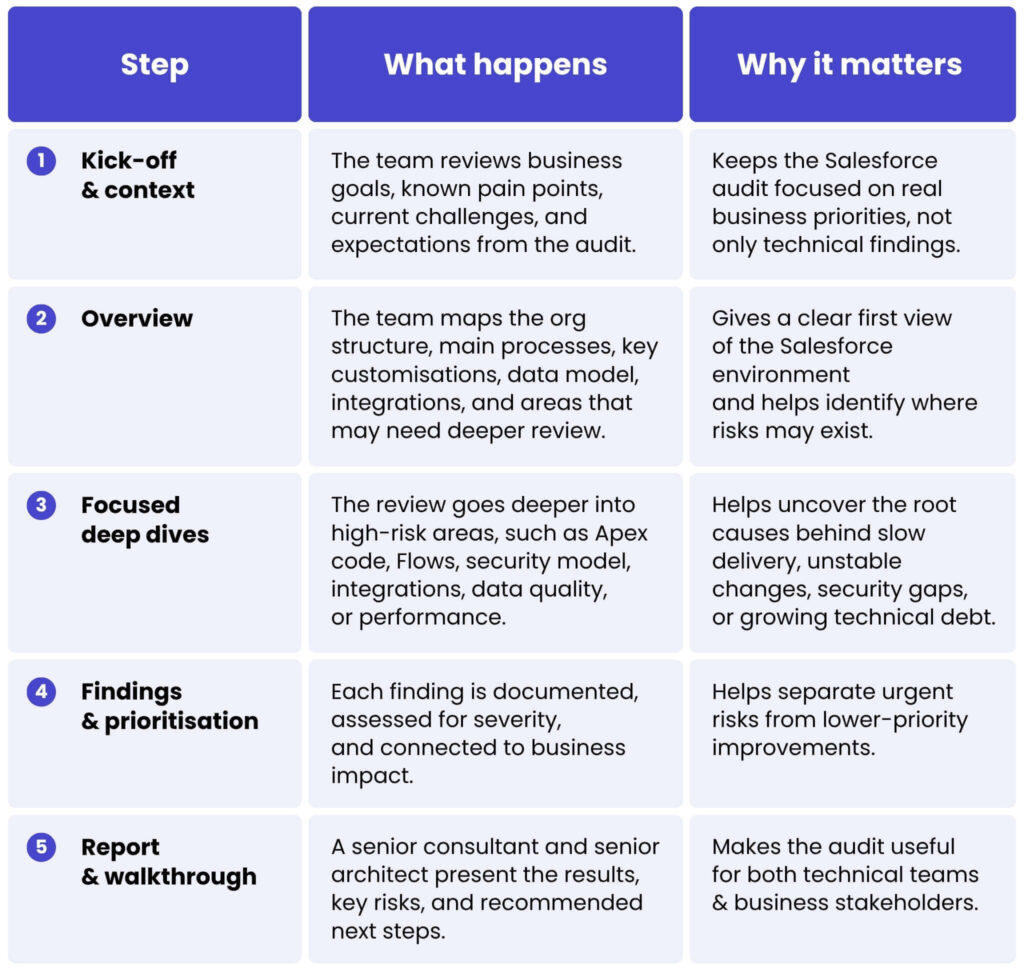
The output should not be a raw list of technical issues. A useful Salesforce audit report should make the current state of the org easy to understand.
Spyrosoft uses a streetlight approach, in which audit areas are rated green, yellow, or red. This helps stakeholders quickly see which parts of the platform are healthy, which need attention, and which create serious risk.
A key takeaways one-pager can also be prepared for management or board-level stakeholders. It summarises the main risks, priorities, and recommended next steps without requiring them to go through every technical detail.
What happens after the Salesforce audit?
A Salesforce audit should not end with a long report that nobody uses. The real value comes from turning findings into a clear improvement plan.
After the review, each finding should be grouped by risk, priority, and business impact. Some issues may be quick wins, such as removing unused components, fixing risky permissions, updating broken automations, or improving documentation. Others may need a longer plan, such as refactoring Apex code, redesigning integrations, or reducing accumulated Salesforce technical debt.
A useful Salesforce audit report should show:
- the main risks and their severity,
- which issues affect business users most,
- what can be fixed quickly,
- what needs technical planning,
- what should go into the long-term Salesforce roadmap.
For many organisations, the audit becomes the starting point for ongoing improvement. If it shows a recurring backlog, limited internal capacity, or regular platform issues, the next step may be Salesforce managed services, where audit recommendations become planned work instead of forgotten slides.
The goal is simple: after the audit, your team should know where the org stands, what needs attention first, and what should be improved over time.
Final thoughts
A Salesforce audit gives you an independent view of how your org is really built. It helps review architecture, code quality, automation, security, integrations, data, performance, and Salesforce technical debt in one structured process.
This matters because Salesforce problems are not always visible straight away. The platform may still work, but changes may take longer, releases may feel riskier, and teams may lose confidence in reports, data, or delivery timelines.
A well-run audit helps you understand what should be fixed first, what can wait, and what should become part of your longer-term Salesforce roadmap.
If your org has been heavily customised, depends on several integrations, or supports business-critical processes, now may be the right time to review its quality.
Want an independent view of your Salesforce setup? Explore our Salesforce services and see how the Spyrosoft CRM Audit Framework can help you plan the right next step.
FAQ
A Salesforce audit is an independent review of your Salesforce org. It checks areas such as architecture, code quality, automation, security, integrations, data, performance, and Salesforce technical debt, then connects the findings to business impact.
A Salesforce Health Check is usually a lighter review that helps identify visible risks and improvement areas. A Salesforce audit goes deeper into the technical setup, including code, architecture, integration design, automation, and long-term maintainability. For a lighter review, read our guide on the importance of a Salesforce Health Check.
It depends on the size and complexity of the org. In many cases, a Salesforce audit can take from two to several weeks, starting with a high-level review and then focusing on the highest-risk areas.
A Salesforce security audit reviews profiles, permission sets, sharing rules, field-level security, guest user settings, and integration accounts. The goal is to find access risks before they become security or compliance issues.
You should receive a clear audit report with findings rated by severity, practical recommendations, key takeaways for stakeholders, and a roadmap showing what to fix now, next, and later.
The findings can be used by your internal team or turned into a roadmap for ongoing Salesforce managed services. The aim is to move from one-time review to planned improvement.
A thorough audit helps streamline processes, reduce maintenance costs, improve system stability and security, enhance configuration quality, and prepare the environment for scalable growth. Companies can also unlock new Salesforce features and restore the ability to efficiently deliver business requirements.


Ensure your Salesforce solution is set up correctly. Contact our expert to find out more.

Michal Gronowski
Head of CRM Systems
arrow_circle_right Other articles