Making intelligent document processing work in banking – here’s what we found


Intelligent document processing – the use of AI to extract, validate, and route data – isn’t a new concept. Rules-based OCR, template matching, and classic workflow automation have been handling structured documents for years. But there are challenges where those tools fall short: processes involving variable document quality, ambiguous content, and exception-heavy logic. This is where generative AI makes a real difference.
Why intelligent document processing is never what it looks like on paper
Every intelligent document processing engagement has the same moment: somewhere in the early mapping phase, it becomes clear that the process extends far beyond the initial brief. Not because anyone was hiding anything, but because operational processes in large banks accumulate layers of logic, exceptions, and system dependencies that rarely make it into documentation.
In our recent project for a major bank, the process was new client folder verification: checking that the right documentation was in place for individual and corporate customers during onboarding.
While the specifics are unique, the patterns we encountered are common across document-heavy processes in regulated environments.
On paper, that’s a document completeness check. In practice, it was a 20-day control cycle running across four distinct environments:
- branch operational systems where front-line staff work,
- a central data warehouse and customer information system,
- a dedicated control application,
- a document repository.
What the process actually looks like in practice
Systems with different roles
The control application pulled data from a specific report, segmented records by client type (individual vs corporate) and then further divided them by legal form and entity structure. It ran an automatic check for minimum document completeness across the full population, then routed a subset to manual quality review. The document repository held the actual documents. The operational systems held the source data. The control application then tracked errors and resolution status – but it wasn’t the system where corrections were made.
This distinction – between where errors are detected and where they’re actually fixed – turns out to matter enormously when you’re designing an automation layer.
Numbers that define the challenge
The volume was substantial: tens of thousands of new folders per month, the majority relating to individual clients. The automatic check covered the full population, but manual quality review only reached around 12-14% of records. That gap between full coverage and human review capacity is exactly where a well-designed AI layer can have real operational impact. But only if it’s built with an accurate understanding of what the process actually requires.
Why this is not just an OCR problem
Another factor is the documents themselves.
For individual clients, the document set is relatively structured: identity documents, completed forms, residency confirmations where applicable. For corporate clients, it becomes more varied. Depending on the legal form of the entity, the required documentation might include official registry extracts, business registrations, partnership agreements, board resolutions, powers of attorney, or non-standard documents specific to certain entity types. The business logic for what constitutes a complete folder is a matrix, or rather a matrix with exceptions.
The physical reality of production documents
A significant portion of what comes into this process isn’t a clean digital file. It’s a photograph taken on a phone, a low-resolution scan from a branch scanner, or occasionally a handwritten document. Multi-page PDFs are common for corporate documents – especially in the case of complex entities, where they can extend across dozens of pages.
This is why framing IDP as an “OCR problem” is misleading. Classic OCR works well for predictable, well-structured documents. However, it struggles with layout variability, ambiguous content, or unseen formats. When fields appear in unexpected places, the document is partially handwritten, or the business logic depends on context – rules-based systems break down. They either return a wrong answer or no answer, with no mechanism to express uncertainty.
Generative AI models approach this differently. They interpret documents in context, handle ambiguity, and extract meaningful information from document types they haven’t been explicitly trained on. They don’t require a rigid template for every variation – they just need a clear definition of what to look for and the ability to express how confident they are in what they found.
The key is knowing where to apply it. GenAI is most effective in handling ambiguous, variable, and exception-heavy documents – not as a universal replacement. Well-designed automation uses GenAI where it adds value and simpler, cheaper tools everywhere else.
AI that fits your environment, not the other way around
Schedule an AI advisor
Where most automation layers fail to reach
1. The control loop gap
There’s a distinction that’s easy to miss and expensive to discover late: the system that detects errors and tracks their status is not the same as the one where corrections are actually made. As a result, a “resolved” status often reflects a process update – not confirmation that the underlying data has been fixed at the source.
For automation that relies on these status flags to trigger next steps, this creates a real risk: the process can move forward even if the data remains incorrect.
To address this, we introduced an additional verification step that confirms whether the correction has been applied in the source system (not just marked as resolved). This closes a gap that is often overlooked in IDP solution design.
2. The records that fall outside the process
Records that fail the automatic document completeness check don’t re-enter the standard manual quality review path. They’re handled separately – or not systematically handled at all. At the volumes involved, that’s a meaningful number of cases every month sitting outside structured review, with no systematic picture of what’s failing or why.
Part of what we designed for was bringing these records into a structured AI-assisted triage workflow, so that cases which previously fell through the cracks could be reviewed, categorised, and resolved through the same quality process as everything else. It’s about making sure those cases are visible and consistently handled rather than quietly accumulating outside the main flow.
How we approached it
The architecture we developed reflects the actual complexity of the process rather than an idealised version of it. Each layer directly addresses constraints observed in the process described above.
Because we built the solution specifically for the client’s environment, it adapts to existing workflows and system dependencies, rather than forcing the process to fit a predefined tool.
Layer 1: Quality gate
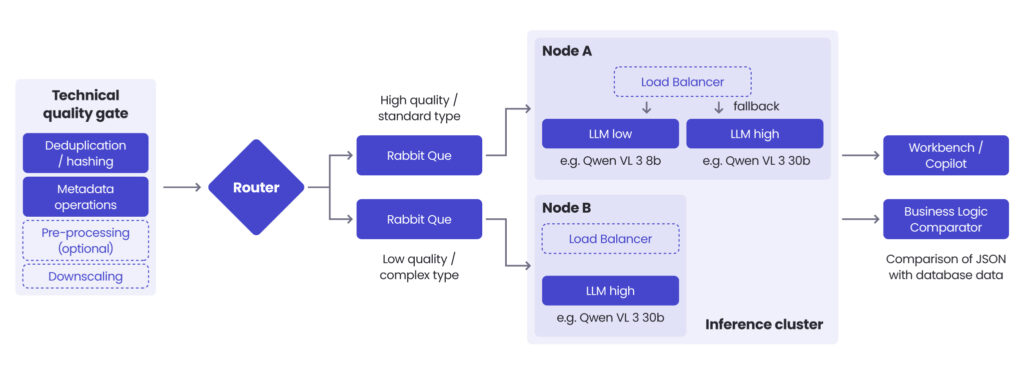
The first layer is pre-processing: a quality gate that every document passes through before any AI inference happens. This stage handles contrast enhancement to improve readability, deduplication, format validation, and basic checks that eliminate empty or corrupt files. Every document filtered here is inference budget saved. Every document that arrives at the model in better condition produces more reliable output.
Layer 2: Routing documents to the right model
Not all documents are equal. Treating them as if they are is expensive and inaccurate. Documents assessed as higher quality (cleaner scans, standard formats, legible content) are routed to a smaller, faster, cheaper model. More ambiguous documents (poor scan quality, handwritten elements, unusual formats) go to a larger, more capable model. Routing based on document quality means spending a compute budget where it actually matters.
Note: Generative AI is one layer of this solution. Simpler document types with clean, consistent formatting may never need a large generative model at all. The architecture is designed to apply GenAI precisely where its capabilities are needed.
Layer 3: Structured extraction & confidence scoring
The model receives a document (or in the case of multi-page PDFs, a sequence of page images) along with predefined field definitions that tell it what to look for. Output is structured JSON: each field populated with an extracted value and a confidence score. For an identity card, that means name, date of birth, document number, expiry date. For a KRS extract, it means registered entity name, partner details, authorisation dates, legal form classification, and other fields specific to the entity type.
The confidence score determines what happens next. High-confidence extractions are cross-referenced automatically against what’s already in the system. Low-confidence extractions are escalated to a human reviewer.
The human review interface
That reviewer interface is built around a principle we consider non-negotiable: the reviewer needs to see not just what the model extracted, but where in the document that information came from. This grounding (showing the source location alongside the proposed value) is what makes human review efficient and reliable. Without it, you’re asking a person to re-do the work the model was supposed to assist with.
Skills for AI agents
As part of this project, we developed dedicated skills for the AI agents involved in document processing. In agentic AI design, a skill is a reusable capability module that an agent draws on when it identifies a situation matching the skill description – in this case, specific document types or processing tasks. Building them as modular components rather than hardcoded logic means the system can be extended to new document types without redesigning the underlying pipeline. Well-designed agentic systems separate what an agent knows how to do from the specific task it’s currently executing – and that separation is what makes them maintainable and scalable in production.
Read more about enterprise AI agents & multi-agent systems
Go to the article
What we set out to validate
The architecture above was shaped by three specific validation questions we needed the solution to answer.
The first was whether the pipeline could handle real production documents – not clean samples, but the actual variety of inputs this process sees: low-quality scans, multi-page PDFs, handwritten content, and documents across different entity types. For this, we ran technical validation on a set of document types covering both individual and corporate onboarding scenarios: including identity documents and multi-page corporate registry records. Both were processed using a vision-capable multimodal model, with PDFs converted into sequence of images, as required by the production pipeline.
The results? All predefined fields were successfully extracted into structured JSON output with field-level confidence scores. For identity documents, this includes fields such as name, date of birth, document number, and expiry date. For corporate records, the model correctly identified entity names, partner details, authorisation dates, and legal structure classifications. Confidence scoring behaved as intended, clearly separating high-certainty outputs from those requiring human review, even with real-world variation in document quality.
The second question was whether the solution could close the control loop between the control application and the source systems – not just flag errors but verify that corrections had been made where needed.
The third was whether records failing the automatic completeness check could be brought into a structured review workflow rather than handled outside the main process.
What the infrastructure reality looks like
Even a well-designed architecture fails if it cannot run within the bank’s infrastructure constraints.
Sending customer documents to a public API isn’t an option in a regulated banking environment. The solution needed to run entirely on infrastructure the bank controls, without external connectivity – an air-gap deployment. Documents stay inside the bank’s perimeter. Models run on bank-managed hardware. Running capable vision models on-premise requires appropriate hardware: GPU infrastructure, configuration, and ongoing management.
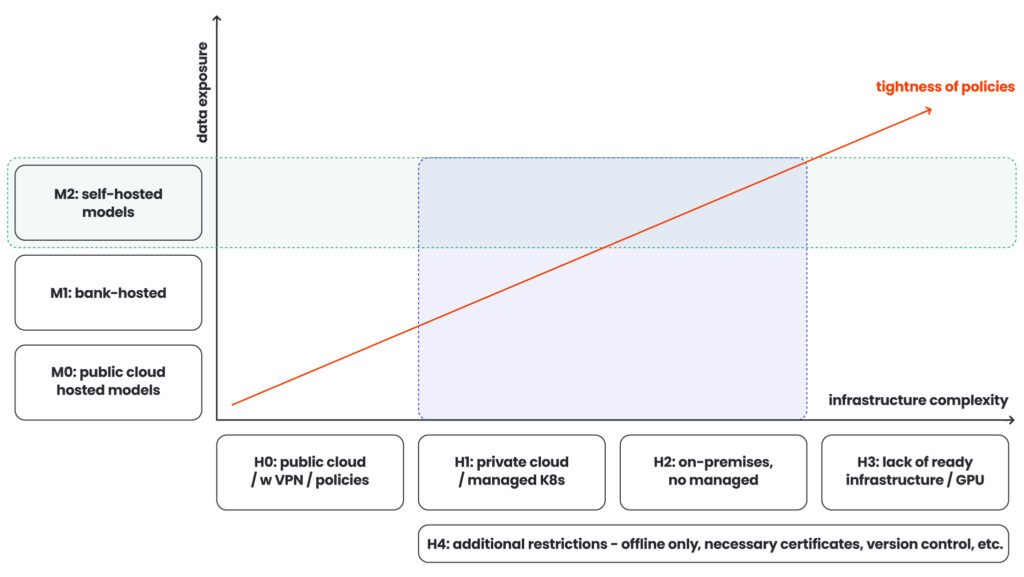
Whether the bank already has suitable machines or needs to procure them is a variable that belongs in the project estimate from the start – discovering it late turns an approved budget into a reopened conversation.
Model hosting: three options with different trade-offs
Banks also need to make real choices about how they host models – whether the infrastructure team manages them centrally, operational teams deploy and manage them directly, or the bank runs them in a controlled cloud environment with appropriate data boundaries. Each option has different cost, operational complexity, and risk profiles. If you clarify this during the engagement, rather than after you set up the architecture, you’ll avoid the most common source of late-stage project friction.
| PUBLIC CLOUD HOSTED | BANK-HOSTED | SELF-HOSTED(ON-PREMISE) | |
| Who manages the model | Cloud provider | Bank’s infrastructure or IT team | Operational teams or dedicated on-prem ML ops |
| Where data stays | Provider environment, governed by DLP policies and contractual boundaries | Inside the bank’s controlled cloud perimeter | Bank-owned hardware, fully air-gapped |
| Operational complexity | Low (no infrastructure to own or maintain) | Medium (requires managed Kubernetes or private cloud capability) | High (GPU infrastructure, configuration, ongoing management) |
| Compliance risk | Higher (robust policy controls to meet banking data residency rules) | Low-medium (data boundaries controlled by the bank) | Lowest (documents never leave the bank’s physical perimeter) |
| Best fit for | Teams already on public cloud with strong DLP policies and regulator-approved data boundaries | Banks with existing private cloud (e.g. OpenShift/K8s) and a central infrastructure team | Banks with strictest data residency requirements and existing on-prem GPU infrastructure |
Conclusion
Most organisations considering an IDP project in a regulated environment already know they have a document problem. What they underestimate is the real complexity lying beyond the documents – in process logic, system dependencies, infrastructure constraints, and gaps that only emerge once you’ve mapped the full flow.
This is where the right partner makes a difference. Not in selecting a model or building a pipeline, but in defining the true scope before development starts. That includes uncovering hidden dependencies, edge cases, control gaps, and architectural constraints.
If this step is missed, you risk investing in a solution built for the problem as it appears on paper, not as it exists in production.
Successful projects start by asking hard questions early. That’s where we begin.
If you’re considering an IDP project and want to understand the real scope before committing to an approach – not just the technology, but the process, the architecture, and the implementation model – we’re happy to have that conversation. Fill in the form below to get in touch with our expert.
FAQ: Intelligent document processing in banking
Intelligent document processing goes beyond traditional optical character recognition by combining artificial intelligence, machine learning, and natural language processing to extract data from both structured and unstructured documents. Unlike classic tools that rely on fixed templates, intelligent document processing solutions can interpret context, handle unstructured data, and adapt to varying document formats, making them far more effective for real-world document processing workflows.
Modern intelligent document processing software is designed to process unstructured documents such as contracts, registry extracts, or scanned documents with inconsistent document layouts. It uses machine learning and natural language processing to identify relevant data fields and convert them into usable digital data, even when the structure is unclear. This makes it possible to reliably process data from complex business documents that would otherwise require extensive manual document processing.
Not entirely, but it can significantly reduce it. Intelligent document processing minimises manual data entry by automating data capture, data validation, and document classification. However, manual intervention is still required for low-confidence cases or edge scenarios. The goal is not elimination, but reducing manual data entry, lowering human error, and removing repetitive data entry from core business workflows.
Automated document processing can handle a wide range of document formats, including:
– Paper documents and scanned documents
– Structured forms (e.g. onboarding forms)
– Unstructured documents (e.g. contracts, legal records)
– Domain-specific files like invoice data or patient records
The ability to process both structured data and unstructured data is what makes intelligent document processing particularly valuable in banking.
Data validation ensures that extracted relevant data is accurate and consistent with existing business systems. In intelligent document processing solutions, extracted values are cross-checked against source systems or business rules. This step is essential to maintain data integrity, especially in regulated environments where incorrect data capture can impact downstream business processes.




arrow_circle_rightContact us
Get an honest assessment – talk to our AI expert

Tomasz Smolarczyk
Director of Artificial Intelligence
arrow_circle_right Our articles