Salesforce Health Check: how to audit your org in 2026


When was the last time you checked what is really happening inside your Salesforce org? On the surface, everything may look fine. Users can log in, reports open, and teams continue their daily work. But behind the scenes, your org may already be carrying hidden risks: outdated automations, unused fields, broad permissions, duplicate data, slow record pages, or integrations that need manual fixes. That is why a Salesforce Health Check should be more than a quick security review. It should help you understand whether your Salesforce setup is still secure, clean, reliable, and ready for future changes.
In 2026, this matters even more. Many Salesforce environments now support more users, more integrations, more automation, and more business-critical data than they did a few years ago. Without regular review, small issues can turn into Salesforce technical debt, poor Salesforce data quality, reporting problems, and slower delivery of new changes.
A common case is when a sales team says that pipeline reports are inaccurate. The report may look like the problem, but the real cause could be duplicated accounts, missing opportunity fields, outdated validation rules, or a sales process that no longer reflects how the team works.
Salesforce Health Check helps find the root cause, not just the visible symptom. It gives your team a clear view of the risks, priorities, and practical next steps to improve the platform.
What is the Salesforce health check?
A Salesforce Health Check is a structured review of your Salesforce org. It helps you see what works well, what creates risk, and what should be improved before small issues become bigger problems.
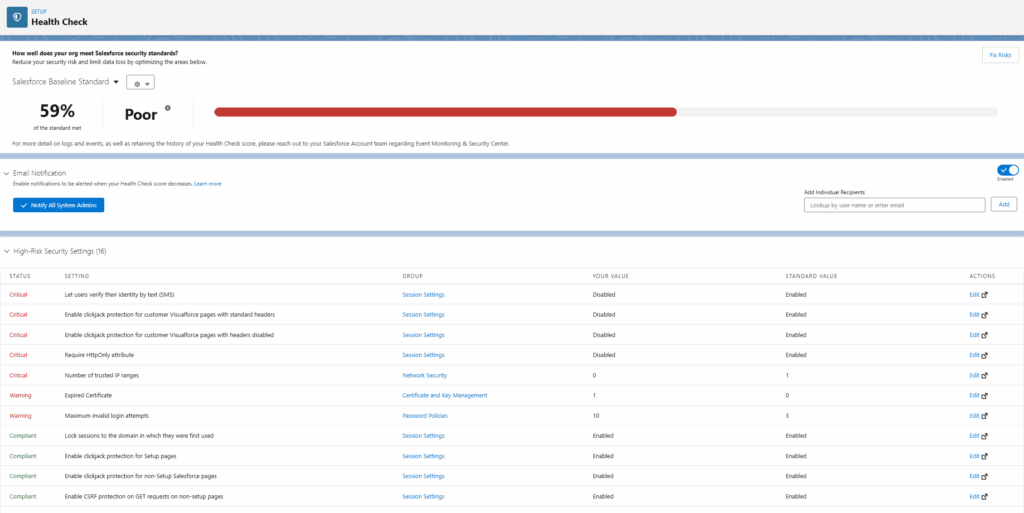
It is useful to look at it in two ways.
Salesforce has built-in tools that can help admins review parts of the org. The native Security Health Check focuses on security settings, such as password rules, session settings, and other security-related configurations. Salesforce Optimizer can also highlight selected setup and usage issues, but will be retired in the Winter’26 release.
These tools are helpful, but they do not show the full picture.
A broader Salesforce org audit goes deeper. It reviews how Salesforce is built, how users work with it, how data is managed, how automations run, and how integrations connect Salesforce with other systems.
For example, your security settings may look fine, but users may still complain that reports are wrong. After a deeper review, the issue may not be the report itself. The problems may be caused by duplicated account records, missing required fields, old validation rules, or a sales process that no longer matches how the team actually works.
Salesforce Health Check helps answer questions like:
- Is our Salesforce org secure?
- Can we trust our data and reports?
- Are our Flows and automations still easy to maintain?
- Are users following the intended process?
- Are the integrations working correctly?
- Is technical debt making every new change harder?
In simple words, a Salesforce Health Check helps you understand whether your org is still supporting the business properly, or whether it needs cleanup, optimisation, better governance, or ongoing support.
Salesforce Health Check vs Salesforce Optimizer vs full org audit
A Salesforce Health Check, Salesforce Optimizer, and a full Salesforce org audit can all help you understand your Salesforce setup. However, they are not the same thing.
Salesforce’s built-in Security Health Check is useful for reviewing security settings and spotting configuration risks. Salesforce Optimizer can help identify selected setup and usage issues. These tools are a good starting point, especially for admins who want a quick view of potential problems.
But they do not replace a broader review.
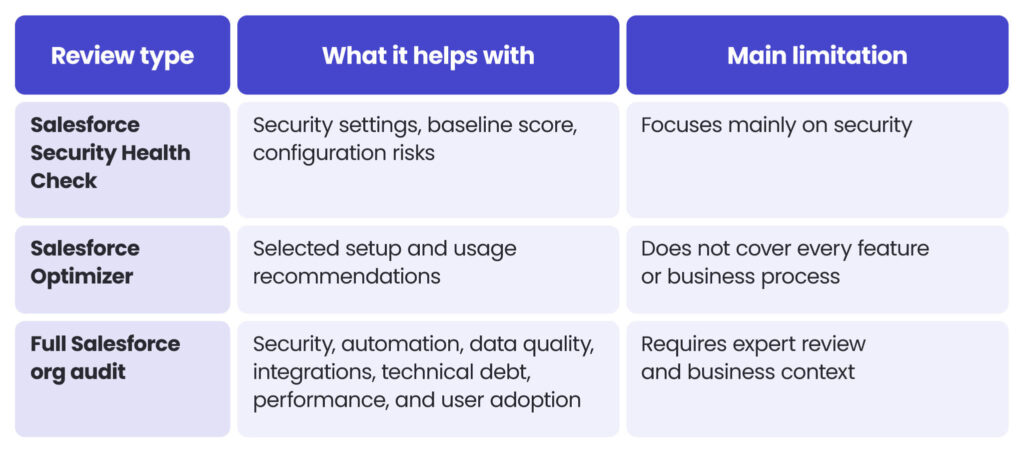
Salesforce Optimizer may show that some fields or reports are unused. A full audit goes further and checks whether they are truly safe to remove, whether they affect integrations, whether users still need them for a hidden process, and whether cleaning them up should be part of a wider Salesforce improvement plan.
That is why the best approach is not to choose one option and ignore the others. Built-in tools are a good starting point, but a wider Salesforce audit helps turn findings into a practical roadmap. For larger or more complex setups, this can also connect naturally with ongoing Salesforce managed services, where audit findings become planned improvements instead of forgotten recommendations.
Signs your Salesforce org needs a Health Check
Salesforce problems often build up slowly. At first, they look like small daily frustrations. Over time, they can affect reporting, user adoption, security, and delivery speed.
Your organisation may need a Salesforce Health Check if you notice signs like these:
- Reports are no longer trusted.
- Users work outside Salesforce.
- Flows are difficult to change.
- Too many users have broad access.
- Duplicate or incomplete data appears often.
- Integrations need manual fixes.
- Pages feel slow or overloaded.
- New changes take too long.
For example, a service team may start manually reassigning cases because routing no longer matches the team structure. At first, this may look like a small workaround. Later, it can affect response times, reporting accuracy, and team performance.
A Salesforce Health Check helps separate symptoms from root causes. It shows what should be fixed first, what can wait, and what may require a longer improvement plan.
If the findings show recurring platform issues, they can also become a roadmap for Salesforce managed services.
What should a Salesforce Health Check review include?
A good Salesforce Health Check should review the entire org, not just a single setting, report, or dashboard. Salesforce often supports several teams, automations, integrations, and business processes, so the review should show how these parts work together.
The main areas to check include:
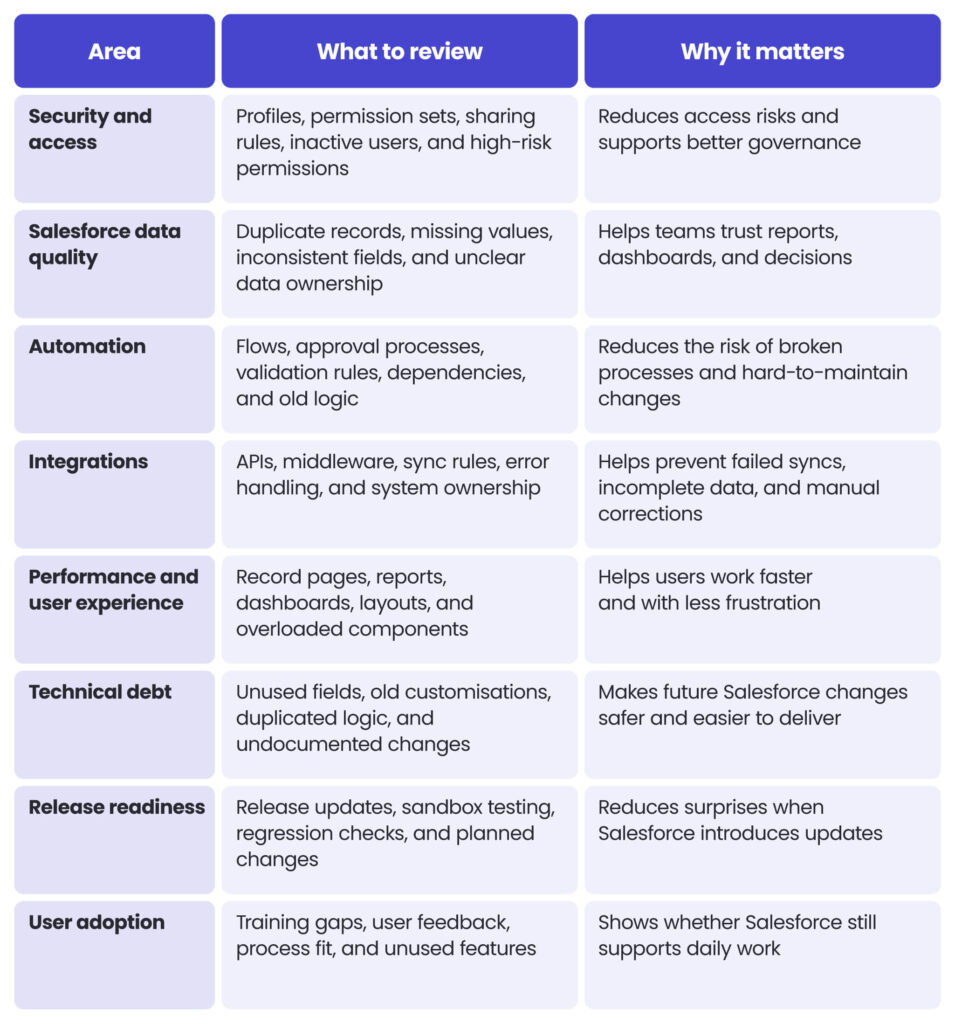
This kind of review is especially important when an organisation uses several Salesforce products or connected systems. A small change in one area can affect reporting, automation, integrations, or user permissions elsewhere. If your organisation uses multiple clouds, it is worth checking how different Salesforce cloud tools support your sales, service, marketing, and operational processes.
What happens after the Salesforce Health Check?
A Salesforce Health Check should not end with a list of problems. The real value comes from turning findings into a clear improvement plan.
After the review, each finding should be grouped by priority, risk, and business impact. Some items may be quick wins, such as removing inactive users, cleaning up unused fields, or adjusting permissions. Others may need a longer plan, such as redesigning complex Flows, improving data governance, or reviewing integrations.
A useful Health Check report should give your team:
- a clear summary of the main risks and improvement areas,
- priorities based on business impact,
- quick wins that can improve the org faster,
- technical recommendations for security, data, automation, integrations, or performance,
- a practical roadmap showing what to fix now, next, and later.
This helps teams move from reactive fixes to planned improvement. Instead of solving the same issue again and again, they can identify and understand the root cause and decide how to address it properly.
The main goal is simple: the Health Check should give you a clear answer to what needs attention now, what can wait, and what should become part of your longer-term Salesforce roadmap.
Wrapping up
A Salesforce Health Check helps you understand whether your org is still secure, reliable, and ready to support future business changes.
It is not only about finding technical issues. It is about seeing the bigger picture: security, access, data quality, automation, integrations, performance, technical debt, release readiness, and user adoption. When these areas are reviewed together, it becomes easier to decide what should be fixed first and what can be planned for later.
In 2026, this kind of review is especially important for organisations that have used Salesforce for several years, added many customisations, or connected the platform with other business systems. A regular Health Check can help you reduce risk, improve trust in data, and make future Salesforce changes safer.
If you are unsure whether your Salesforce org is still secure, scalable, and easy to maintain, explore our Salesforce services and discuss the right next step with our team.
FAQ
A Salesforce Health Check is a structured review of your Salesforce org. It helps identify risks, gaps, and areas for improvement across security, data, automation, integrations, performance, and user adoption.
No. Salesforce’s built-in Security Health Check focuses mainly on security settings, but a broader Salesforce Health Check can also review technical debt, data quality, automations, integrations, and business process fit.
Many organisations should run a Salesforce Health Check at least once a year, before major projects, or when recurring issues appear in reports, automations, integrations, or user adoption.
The findings should be grouped by risk, priority, and business impact. The output should include quick wins, technical recommendations, and a practical improvement roadmap.
Yes. If the review shows recurring issues or a larger backlog, the findings can help shape future Salesforce managed services and ongoing platform improvements.


arrow_circle_rightCONTACT
Do you need support with Salesforce Healthcheck?

Michal Gronowski
Head of CRM Systems
arrow_circle_right our articles