Cloud computing guide: deployment models, service models, and migration


Still not sure which deployment model or cloud service best suits your business? Or perhaps you’re unfamiliar with cloud terminology and need a simple guide to help you understand cloud computing? You’ve come to the right place.
We’ve compiled all the cloud-related articles from our blog into this comprehensive guide for anyone considering a cloud-based solution or migrating their software to the cloud.
What is cloud computing?
Cloud computing means using IT resources over the internet instead of running them yourself. Cloud providers offer computing services such as servers, data storage, databases, networking, and software from remote data centers, and they deliver computing resources on demand. Because you access rented computing services through an internet connection, you no longer need to buy and maintain physical servers and other physical hardware in your own data centers. The work runs on remote servers instead.
These cloud computing services range from basic infrastructure services, such as virtual servers and storage, to finished technology services, such as email or analytics tools.
How is this different from the traditional client-server model? There, a company owns the servers and the software on them, and its IT team looks after both. In the cloud, the cloud vendor runs the cloud servers, and cloud computing removes much of the work of buying hardware and software maintenance.
At a high level, the cloud computing architecture has two parts: the front end (the applications and devices people use) and the back end (the servers, storage, and network that cloud providers run in large physical data centers). Broad network access means users can reach these resources from almost any device with an internet connection.
Benefits of cloud computing
Cloud computing offers several advantages over traditional IT. The benefits of cloud computing include:
- Cost savings: most cloud providers bill only for the resources you use, so you avoid large upfront investments in hardware and data center space.
- Scalable resources: you can add or remove computing power when demand changes, instead of buying capacity in advance.
- Faster delivery: new virtual machines can be created in minutes and removed when you no longer need them.
- Advanced computing capabilities: cloud platforms give you access to data analytics, big data analytics, serverless computing, and artificial intelligence tools without building them yourself.
- Resilience: backups and disaster recovery are easier to set up on cloud-based infrastructure than in traditional data centers.
What are the cloud deployment models?
A cloud deployment model defines who has access to the infrastructure and who uses it: only you, many customers, or a combination of both. Choosing the right model is one of the first decisions of any cloud strategy. It affects cost efficiency, ease of setup, level of control, scalability, cloud security, and your ability to meet strict regulations.
Let’s take a close look at the four main cloud deployment models (public cloud, private cloud, hybrid cloud, and multicloud) and see how they differ in cost, ease of setup, level of control, and scalability.
Public cloud
A public cloud is hosted by a third-party provider who manages the entire infrastructure, both hardware and software. You can manage it to a certain extent, but not as much as in a private cloud. The name “public cloud” means that the service is accessible to the public, but the data stored in it isn’t available to everyone.
What level of control does a public cloud give? You can configure and, to some extent, manage the network, load balancing, and routers, but you can’t decide which machine is allocated to you. The main pros of a public cloud compared with other deployment models are:
- no need to invest in or be responsible for hardware,
- a cost-efficient pay-per-use model,
- very high scalability,
- software licence included in the price.
However, remember that some government policies, industry standards, or legal requirements specific to your business niche may not be met by public cloud platforms.
Private cloud
In a private cloud, the infrastructure is for your exclusive use. The servers are provided by a third-party vendor, for example, a data centre.
The key advantage of the private cloud model is that it can be tailored to your needs thanks to flexible configuration options, so your solution can meet very specific business or legal requirements.
There’s another side to the coin, though. In a private cloud, you only get virtual machine and network access to start with. If you want to set up and manage the environment, you’re left to do it on your own. The SLA can be lower than in a public cloud, and there are no pre-built solutions or additional services to make setup and management easier. To have everything up and running, you’ll need the help of IT specialists.
If high scalability is one of your needs, a private cloud may be a less favourable option. The limited possibility of hardware extension makes it less scalable than a public cloud.
Hybrid cloud
A hybrid cloud combines a private and a public cloud, or a cloud with on-premise infrastructure. In this model, all the infrastructure is connected, enabling data flow and integration.
A hybrid cloud offers the benefits, but also the downsides, of both worlds. It’s cost-efficient because if you don’t need part of your resources, you can move it to on-premise and vice versa. However, configuring a hybrid cloud and making sure everything is smoothly linked together, for example through a VPN, is not easy and requires expert knowledge and skills.
A hybrid cloud can also be useful when migrating your business to the cloud, as it ensures the continuity of processes.
Multicloud
Multicloud means using more than one cloud from multiple vendors. It may be worth considering if you want to optimise costs or gain a competitive advantage. One cloud deployment model may better address your requirements for solution A, while another suits solution B. The only challenge is the tricky cross-cloud connection, which requires expert knowledge and skills.
What are the cloud service models?
A cloud service model specifies the scope of control and responsibility for the infrastructure and data. Depending on your needs, more of it can sit on your side or on the provider’s.
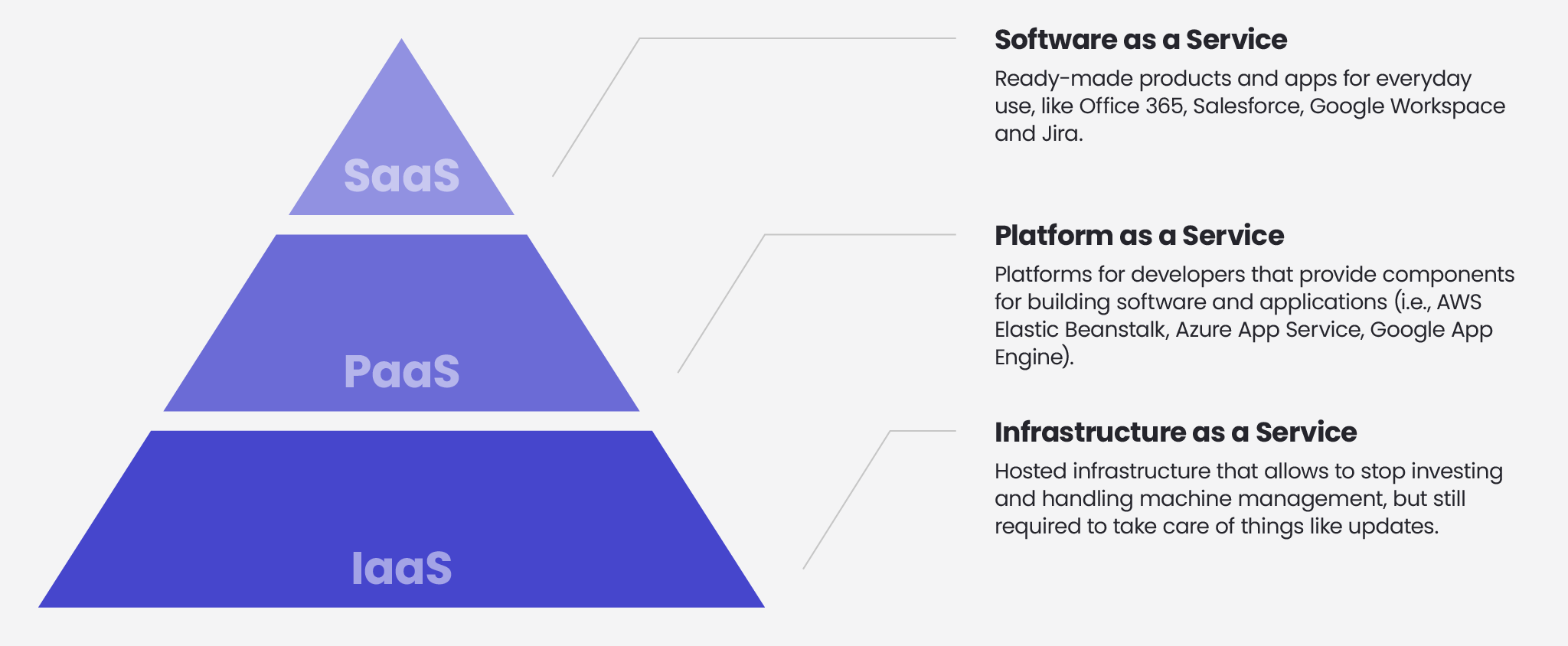
SaaS vs PaaS vs IaaS
Infrastructure as a Service (IaaS)
The IaaS model gives you access to servers, storage, and networks, and it includes virtualisation. Your developers take care of the operating system, middleware, runtime, data, and the application itself.
The advantages of IaaS are:
- It’s easier to manage than on-premise infrastructure, because security and configuration tasks are handled by the vendor.
- It offers flexibility, as it’s the most customisable of the three cloud service models.
- You don’t have to worry as much about vendor lock-in, because you aren’t closely tied to a specific cloud provider.
- It’s a good solution for migrating legacy apps that aren’t cloud-ready, because it’s flexible to configure.
However, high flexibility brings additional responsibility. With IaaS, your developers are in charge of keeping the environment up to date and doing regular backups as part of maintenance.
Platform as a Service (PaaS)
PaaS provides your developers with the components they need to build software. You don’t have to worry about servers, storage, the operating system, runtime, or virtualisation, so your developers can focus on development.
The benefits of PaaS include:
- Shorter deployment time, because you don’t have to create and configure your own work environment. You can use ready-made tools and options for routine tasks.
- No need to worry about system or component upgrades. It’s all the vendor’s duty.
- In many cases, PaaS solutions are easier to scale than IaaS or SaaS.
PaaS also has some limitations. Older applications may not work well in this model and may need to be refactored or rewritten during migration. In most cases, you also become tied to a single vendor.
Software as a Service (SaaS)
In SaaS, the provider develops, manages, and maintains the software in the cloud environment. As a customer, you get a ready-made product, and everything else is the provider’s responsibility.
SaaS offers two main benefits:
- It’s an up-and-running solution that needs no development or hosting by your team.
- There are no initial setup costs, because everything is covered by the monthly subscription.
As with any ready-made solution, SaaS has its downsides. The major one is limited customisation: you can’t really tailor it to your specific business needs. The other is a lack of control over the infrastructure, so you have to trust the vendor in everything.
Is the cloud secure?
This is one of the most fundamental questions in almost any discussion about the cloud.
Whether you keep your data in a private or a public cloud, you need to make sure that all security procedures and standards are in place. Public cloud providers follow the shared responsibility model: they give you the tools to keep your data secure, but you need to know how to use them correctly.
Public cloud providers very often have the highest security standards, as well as the knowledge of and access to a wide range of complex security solutions. This can make a public cloud even safer than on-premise infrastructure.
What does the cloud migration process look like?
Let’s now look at what lies ahead if you plan to move your application to the cloud.
There’s no one-size-fits-all approach, and everything depends on your specific needs. Without going into too much detail, though, we can put together a high-level cloud migration plan.
Step 1: Establish the cloud migration scenario
At this step, decide whether you want a full or partial migration to the cloud, and choose a cloud deployment model.
Step 2: Identify your needs
Access to some data may be hampered during migration, so decide which infrastructure elements you absolutely need to keep accessible. This will also help you determine more accurately the size of your cloud infrastructure, which affects costs.
Step 3: Implement a cloud migration strategy that fits your needs
There are seven approaches to cloud migration (also known as the 7Rs):
- Retain
- Rehost (Lift & Shift)
- Relocate
- Re-platform (Lift & Reshape)
- Repurchase (Drop & Shop)
- Refactor
- Retire
Before the migration starts, you should also have a plan for preventing or addressing possible challenges along the way. A few common ones are described below.
What are the challenges of cloud migration?
The two top challenges that can threaten a successful migration are insufficient preparation and too much data to migrate at once.
To avoid them, first go through your ecosystem and identify all the elements to be migrated, analyse their cloud readiness, and determine the most appropriate migration method. Second, check whether your internet bandwidth allows you to transfer the required amount of data in the time available. If it doesn’t, cloud vendors offer special services for moving large amounts of data in and out of the cloud.
A successful migration may also be impossible without enough knowledge and skills to handle it properly. If you don’t have qualified specialists on your team, consider outsourcing the process.
How are cloud solutions evolving?
Cloud adoption is no longer about whether to move, but about how to run workloads efficiently, securely, and in line with regulations. Several trends shape cloud strategies today:
- AI and GPU workloads: machine learning and generative AI have become a major driver of cloud demand, as most organisations rent specialised compute and managed AI services instead of building their own infrastructure.
- Cost control (FinOps): as cloud bills grow, companies increasingly track and optimise spending, and some move selected workloads back on-premise or to hybrid setups.
- Data sovereignty and regulation: in Europe, requirements around data location and operational resilience (such as GDPR, NIS2, and DORA for the financial sector) influence the choice of provider and deployment model.
- Hybrid and multicloud as the norm: many organisations combine several providers, or mix cloud with on-premise systems, to reduce risk and meet compliance needs.
- Serverless and managed services: teams increasingly choose managed and serverless services to reduce operations work.
- Platform engineering and automation: infrastructure as code and internal developer platforms help teams ship faster and keep environments consistent.
Serverless is not a new idea for us. Back in 2020, our DevOps engineer Marcin Szremski already pointed to it as the main focus of cloud development:
“The focus is on serverless, simply because the lack of servers takes away the burden of managing and maintaining data centre infrastructure. Dispersed cloud environments offer flexible solutions that guarantee effectiveness and scalability.”
Read the 2020 interview with Marcin Szremski to see how these predictions began.
Are there any limits to what cloud solutions can handle?
Very few. Technically, the cloud can support almost any workload, from small web applications to large financial and public-sector systems. The real limits usually come from regulation, such as rules on data location, industry-specific compliance, and national policies.
This is how Marcin Szremski put it in the same interview:
“It’s difficult to find a solution where the cloud can’t be applied. Even government institutions are using cloud services. There are limits to what the cloud can do, but they are almost non-existent and are mostly caused by the legislative regulations and policies of each country.”
Cloud use case: how switching to AWS let TakTo stay more flexible
Hopefully, the theoretical part of this guide has made the cloud less confusing. Now let’s look at a real-life cloud implementation we carried out for one of our clients: TakTo.
TakTo is a financial company based in Wrocław, Poland. Its customers can take out loans through an online chat and repay them via a dedicated customer platform.
For many years, TakTo had been using servers that needed to be maintained and scaled up at a physical location outside its headquarters. In the long run, this became troublesome, and the team needed more convenient access to the servers. The physical space was also costly and had to be kept in optimal conditions, so technical staff were employed to look after the machines. The outdated infrastructure required near-constant investment.
Our team at Spyrosoft analysed the needs and available solutions and quickly concluded that migrating to the cloud was the way to go. The challenge was that customers had to be able to use the application at all times, without interruption. The migration was therefore divided into several stages, and we took the “lift and shift” approach, in which the whole process is completed with little to no change.
The final stage focused on TakTo’s databases, which were extensive and, from a technical point of view, the trickiest element to move to Amazon’s virtual servers. All data had been secured in advance through a series of backup transfers, so that Spyrosoft’s team could easily access and restore it if any of the services didn’t operate as expected.
As a result, TakTo has been able to stop using physical servers and can now add virtual machines whenever it needs to. This saved money and gave the company a great deal of flexibility, so it can act faster and shorten the time to market for new services.
What is virtualisation, and is it the same as the cloud?
In 2020, together with our Head of DevOps, Marcin Szremski, we dived into this topic to answer the question and show how the two are linked.
Virtualisation
Virtualisation came from the need to use hardware resources effectively. In simple terms, it means sharing one physical machine between many virtual ones. We can run multiple virtual servers on a single physical server, which brings many benefits. For example, we can test applications in different environments (such as different operating systems) without buying additional computers.
How does virtualisation work?
Virtualisation requires a hypervisor, software that lets multiple operating systems run on a single physical host. Popular examples include Microsoft Hyper-V, VMware ESXi, KVM, Xen, and Proxmox VE on the server side, and Oracle VirtualBox on the desktop side. All hypervisors fall into two groups:
- Type 1: hypervisors installed directly on the host hardware, which control it.
- Type 2: hypervisors designed as software running on top of a traditional operating system.
Cloud computing
Cloud computing is another step in the evolution of virtualisation.
First, you should know that all cloud providers use virtualisation to host their services:
- AWS: Xen and the Nitro Hypervisor (a KVM-based hypervisor rebuilt by AWS for its own needs)
- Azure: a rebuilt version of Hyper-V
- GCP: KVM
So, virtualisation and cloud computing are not the same thing. The cloud is a solution built on virtualisation.
Some cloud services spare us from caring about servers, networks, storage, and so on. The cloud is not only virtual servers that we can create in a second and remove a few minutes later. It also frees us from worrying about licences, space in the server room, or even unused servers that we bought. We pay only for what we use and when we use it. The cloud offers many ready-to-use services, and we don’t have to care about the underlying infrastructure. Of course, under a PaaS service there is still hardware and hypervisor software, but responsibility for that part lies with the cloud provider, so we can focus on our core business.
Ready for cloud adoption?
Moving to the cloud is a complex process, and the right expert help can save you time, budget, and risk.
Our experienced cloud engineers can advise you on cloud infrastructure and take care of the whole process, including code and documentation review and designing the high-level architecture. We will map your application portfolio and give you a plan for each application before you commit budget.
FAQ: cloud computing
The four main cloud deployment models are public cloud, private cloud, hybrid cloud, and multicloud. They differ in who can use the infrastructure, how much control you have, and in cost, scalability, and complexity of setup.
The types of cloud computing are usually grouped in two ways: by deployment model (public, private, hybrid, and multicloud) and by service model (IaaS, PaaS, and SaaS).
A cloud service provider is a company that offers cloud computing services, such as computing resources, data storage, and software, over the internet. Well-known examples are AWS, Microsoft Azure, and Google Cloud.
The difference is how responsibility is split between you and the provider. With IaaS, you manage everything above the infrastructure, from the operating system to the application. With PaaS, you manage only your application and data. With SaaS, the provider manages everything, and you just use the software.
It depends on your requirements. A public cloud is usually the most cost-efficient and scalable. A private cloud suits specific business or legal requirements. A hybrid cloud works well when you need to migrate gradually or keep some systems on-premise. Multicloud makes sense when different solutions are best served by different providers.
Often it can be. Public cloud providers invest heavily in security and offer advanced security tools. Under the shared responsibility model, however, you are still responsible for configuring and using those tools correctly.
The 7Rs are Rehost, Relocate, Replatform, Refactor, Repurchase, Retain, and Retire. Each describes a different way of handling an application when moving to the cloud.
No. Virtualisation lets you run multiple virtual servers on one physical server. Cloud computing is built on virtualisation and adds on-demand services, pay-per-use pricing, and provider-managed infrastructure.
Not always, but migration is a multi-step process, and a lack of knowledge and skills is one of its main challenges. If you don’t have qualified specialists on your team, consider outsourcing the migration.



arrow_circle_rightContact us
Find the right cloud strategy for your business

Marcin Zyga
Chief AI & Information Officer